nTop / Support
|

Docs Learn Community

Request ITAR Support Request Support
Sign in
Implicit Modeling
  • How to variable loft?
  • Self-Training Guide
  • How to sweep along rails?
  • How to Create Advanced Swept Surfaces with Conic and Cubic Bezier Sections
  • How to avoid fake zeroes when designing implicits
  • How does nTop determine the material direction for an open profile
  • How to use Conic and Cubic Bézier blocks
  • How to use the Evaluate Expression block
  • How to calculate surface area
  • How do I use the Ramp block?
  1. nTop Support
  2. Knowledge Base
  3. Implicit Modeling

How to extrude a curve

Avatar
Ajay Prasad
May 18, 2026 15:53

Question:

How to extrude a cuve

How to thicken a curve

Answer:

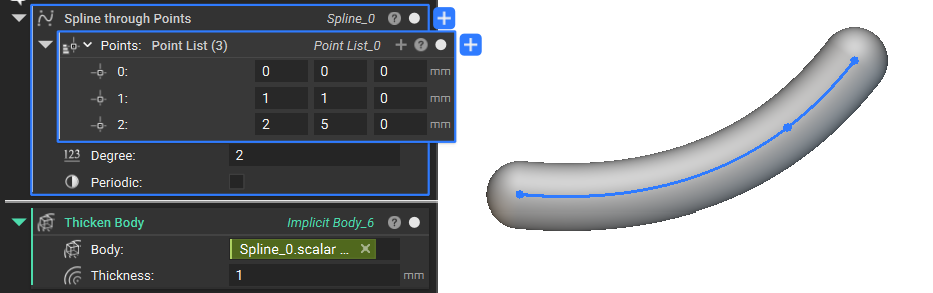
If you want to extrude or thicken Curves, Splines, Lines, or Arcs.

  • Use the Scalar Field from the properties panel
Curve.Scalar Field
  • Use a Thicken Body block to extrude/thicken a curve

A 2D spline converted to an implicit body using a Thicken Body block.

More on this topic:

  • How to create variables
  • Why does my part have extra fragments when I convert it to an Implicit?
  • Can I scale my model non-uniformly?
Was this article helpful?

On this page

    nTop

    199 Lafayette St, 4th Floor
    New York, NY 10012

    © nTopology Inc. 2026. All rights reserved.

    Privacy policy | EULA | Terms of use | Press