How to filter lists based on odd and even items

Objective:

Filter Lists based on odd and even Items

Procedure:

1. Use Sequence block to generate Odd and Even numbers.
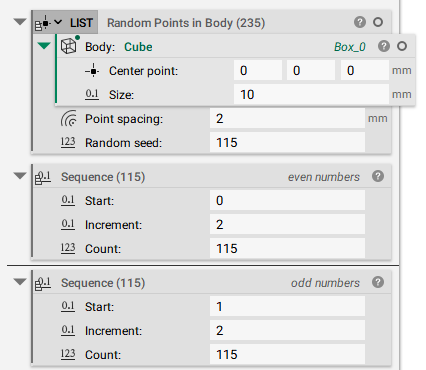
A list of points is generated by using a Random Points in Body block on a Cube block. Two Sequence blocks are added that both have an Increment value of 2 and a Count value of 115. The difference is that one Sequence's Start value is 0 and the other is 1.

2. Use the 2 List Element blocks to create even items and odd items list

  • List: Input your list
  • Index: Drag and drop the round chip from the sequence properties 
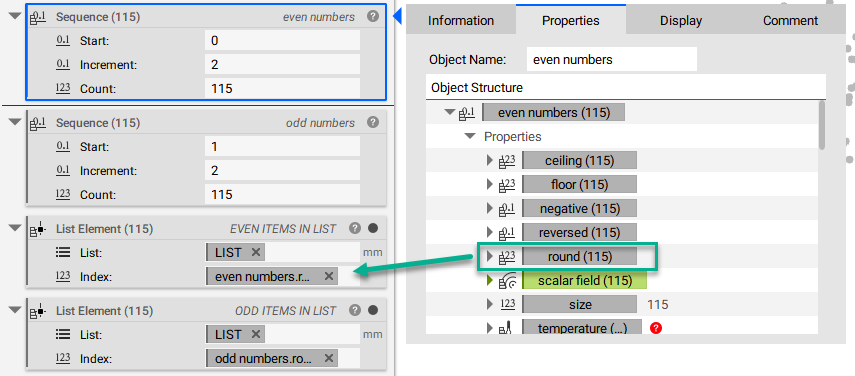
Using a List Element block, the Random Points in Body point list is inserted in the List input. Inside the properties panel of the Sequence starting with 0, the round property chip is extracted and placed in the Index input. This creates a list of only the even values since the Sequence starts on an even number. The same process can be repeated using a second List Element block and the round property chip from the Sequence block that starts at 1.

And that’s it! You’ve successfully created two lists with odd and even items

Are you still having issues? Contact the support team, and we’ll be happy to help!

Download the Example file:

More on this topic:

Keywords:

 lists filter how-to odd even 
Was this article helpful?