
Objective:
To merge multiple FlexNet Publisher license files into a single file to manage split concurrencies or multiple license increments within one license manager.
Applies to:
nTop Org Admins
IT administrators managing FlexNet License Manager
Procedure:
Reference: This procedure is based on the FlexNet Publisher License Administration Guide published by Revenera.
Open your license files: Open each individual license file you received from nTop using a plain text editor (e.g., Notepad).
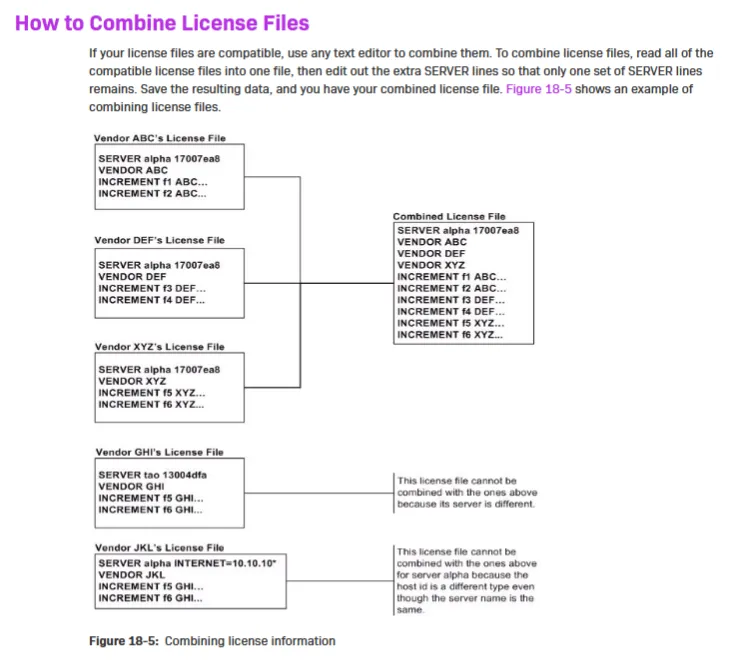
Verify compatibility: Ensure all license files are intended for the same license server (host ID).
Consolidate the text: Copy the entire content of the secondary license files and paste them into the bottom of your primary license file.
-
Remove redundant SERVER lines: Find the lines beginning with
SERVER.A valid combined file must have only one set of
SERVERlines at the top.Delete any additional
SERVERorVENDORlines that appear in the middle of the document after your copy-paste.
Save the file: Save the new consolidated file with a
.licfile extension.-
Restart the License Manager: Open your FlexNet license management tool (e.g., LMTOOLS).
Reread the license file or restart the service to apply the changes.
And that’s it! You have successfully combined your license files! Are you still having issues? Contact the nTop support team, and we’ll be happy to help!