
Objective
This article explains how to export curve and point data from nTop to rebuild surface geometry inside Siemens NX.
Applies to
nTop
Siemens NX
CAD Interop and Geometry Reconstruction Workflows
Supported File Formats
When transferring curve and point data from nTop to Siemens NX, select the file format that best suits your downstream workflow:
- Curves: nTop supports STEP (.stp), Parasolid (.x_t), and IGES (.iges) formats via the Export Part block.
Points: Siemens NX supports point cloud and coordinate imports in ASCII text format via the Export Points custom block.
Procedure
Step 1: Export Curves and Points from nTop
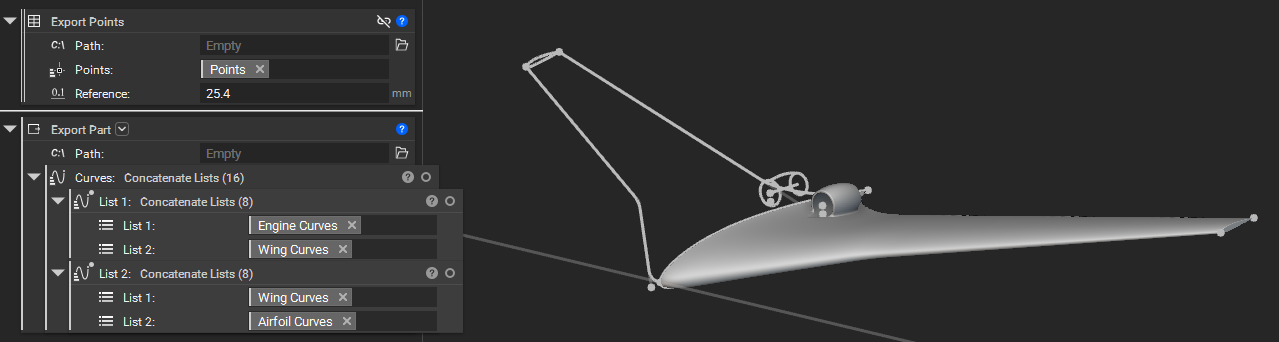
Open your workflow in nTop and locate your wing and duct curve lists.
- Add an Export Part block to export your wing and engine curves. Specify a file path ending in .stp, .x_t, or .iges.
- Add an Export Points block to export point data. Set the destination file path to export in ASCII text format (.txt or .csv).
Step 2: Import Files into Siemens NX
Launch Siemens NX and open your working part file.
Navigate to Home > Import > IGES (or select STEP / Parasolid depending on the format exported from nTop).
Select your exported nTop curve file to import the geometry into your NX workspace.
Import your ASCII point file using the NX Point Constructor or Point import tool.
Step 3: Reconstruct the Surfaces
In Siemens NX, utilize the imported geometry for surface and body construction.
- Imported curves can be used as Section and Guide curves in Sweeps, Extrusions, Revolutions, and other solid and surface features.
- Linear curves can be used as axes and vectors.
- Imported points can be used for constructing curves and datums.
And that’s it! You’ve successfully exported curves from nTop and reconstructed your geometry in Siemens NX.
Are you still having issues? Contact the support team, and we’ll be happy to help!