
nTop 5.50 is here! This release introduces five new export blocks for Analysis Results, two new Conic curve blocks for aerodynamic profile design, and a Path input update that makes folder selection available across all blocks. As with every release, nTop's dedicated support team is ready to answer your questions. Please visit support.ntop.com to gain access to helpful tutorials and support articles.
Conic by Points
Conic by Tangents
Export Static Analysis Result
Export Buckling Analysis Result
Export Modal Analysis Result
Export Thermal Analysis Result
Export Time Dependent Thermal Analysis Result
Usage Improvements
Block Updates
Conic by Points
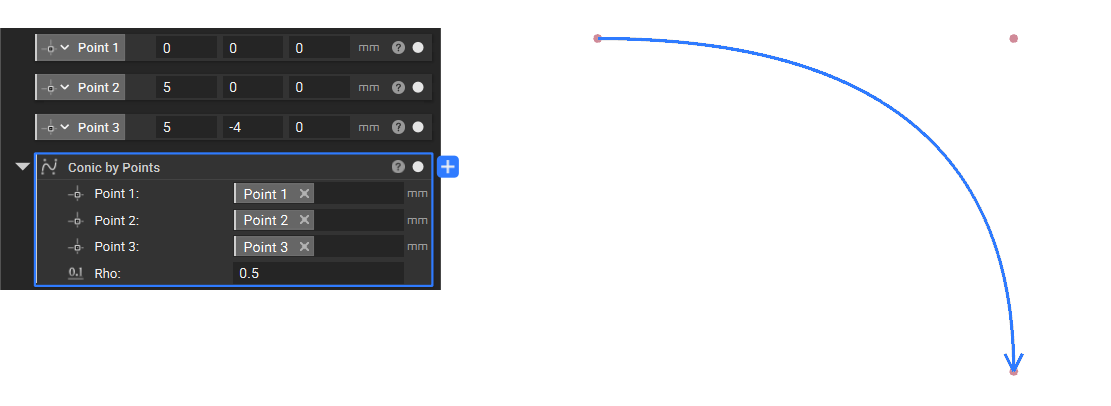
- The Conic by Points block creates a conic curve defined by a start point, an apex point, and an end point. It is commonly used for aerodynamic profiles such as nose cones.
- Location: Create > Curves
- Point 1: Start point of the Conic.
- Point 2: Apex point of the Conic. The tangent lines at the start and end points meet at this point.
- Point 3: End point of the Conic.
- Rho: Rho value of the conic. Accepted range: 0.02–0.95.
- Output: Spline
Conic by Tangents
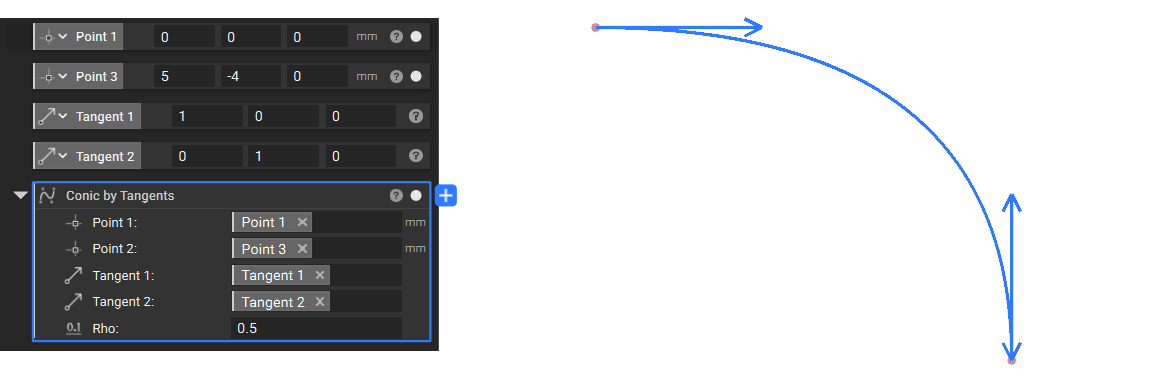
- The Conic by Tangents block creates a conic curve defined by two points and their tangent vectors. The apex of the conic is determined automatically by the intersection of the tangent lines at the start and end points. It is commonly used for aerodynamic profiles such as nose cones.
- Location: Create > Curves
- Point 1: Start point of the Conic.
- Point 2: End point of the Conic.
- Tangent 1: Tangent vector at the start point.
- Tangent 2: Tangent vector at the end point.
- Rho: Rho value of the conic. Accepted range: 0.02–0.95.
- Output: Spline
Export Static Analysis Result
- The Export Static Analysis Result block lets you export a Static Analysis Result to a file for use outside of nTop, such as downstream reporting or data exchange workflows.
- Location: Design Analysis > Export
- Path: The output file path.
- Static Analysis: Static Analysis Result to export.
- Compression: The compression objective. Choose between fastest compression (larger file size), balanced performance (medium file size), smallest file size, or no compression (largest file size). Defaults to Fastest.
- Unit System: (Optional) Target unit system for the exported data. Defaults to MKS units.
- Output: Analysis File Data
Export Buckling Analysis Result
- The Export Buckling Analysis Result block lets you export a Buckling Analysis Result to a file for use outside of nTop, such as downstream reporting or data exchange workflows.
- Location: Design Analysis > Export
- Path: The output file path.
- Buckling Analysis: Buckling Analysis Result to export.
- Compression: The compression objective. Choose between fastest compression (larger file size), balanced performance (medium file size), smallest file size, or no compression (largest file size). Defaults to Fastest.
- Unit System: (Optional) Target unit system for the exported data. Defaults to MKS units.
- Output: Analysis File Data
Export Modal Analysis Result
- The Export Modal Analysis Result block lets you export a Modal Analysis Result to a file for use outside of nTop, such as downstream reporting or data exchange workflows.
- Location: Design Analysis > Export
- Path: The output file path.
- Modal Analysis: Modal Analysis Result to export.
- Compression: The compression objective. Choose between fastest compression (larger file size), balanced performance (medium file size), smallest file size, or no compression (largest file size). Defaults to Fastest.
- Unit System: (Optional) Target unit system for the exported data. Defaults to MKS units.
- Output: Analysis File Data
Export Thermal Analysis Result
- The Export Thermal Analysis Result block lets you export a Thermal Analysis Result to a file for use outside of nTop, such as downstream reporting or data exchange workflows.
- Location: Design Analysis > Export
- Path: The output file path.
- Thermal Analysis: Thermal Analysis Result to export.
- Compression: The compression objective. Choose between fastest compression (larger file size), balanced performance (medium file size), smallest file size, or no compression (largest file size). Defaults to Fastest.
- Unit System: (Optional) Target unit system for the exported data. Defaults to MKS units.
- Output: Analysis File Data
Export Time Dependent Thermal Analysis Result
- The Export Time Dependent Thermal Analysis Result block lets you export a Time Dependent Thermal Analysis Result to a file for use outside of nTop, such as downstream reporting or data exchange workflows.
- Location: Design Analysis > Export
- Path: The output file path.
- Time Dependent Thermal Analysis: Time Dependent Thermal Analysis Result to export.
- Compression: The compression objective. Choose between fastest compression (larger file size), balanced performance (medium file size), smallest file size, or no compression (largest file size). Defaults to Fastest.
- Unit System: (Optional) Target unit system for the exported data. Defaults to MKS units.
- Output: Analysis File Data
Usage Improvements
- The File Path input has been renamed to Path across all blocks and now supports selecting a folder in addition to a file.
Block Updates
- File Path Variable has been renamed to Path Variable.
- The Cubic Bezier block has been renamed to Cubic Bezier Distance Field.
- The Conic block has been renamed to Conic Distance Field.