nTop 5.53 is here! This release adds the new Spline Distance Field and Extend Curve blocks. As with every release, nTop's dedicated support team is ready to answer your questions. Please visit support.ntop.com to gain access to helpful tutorials and support articles.
Spline Distance Field
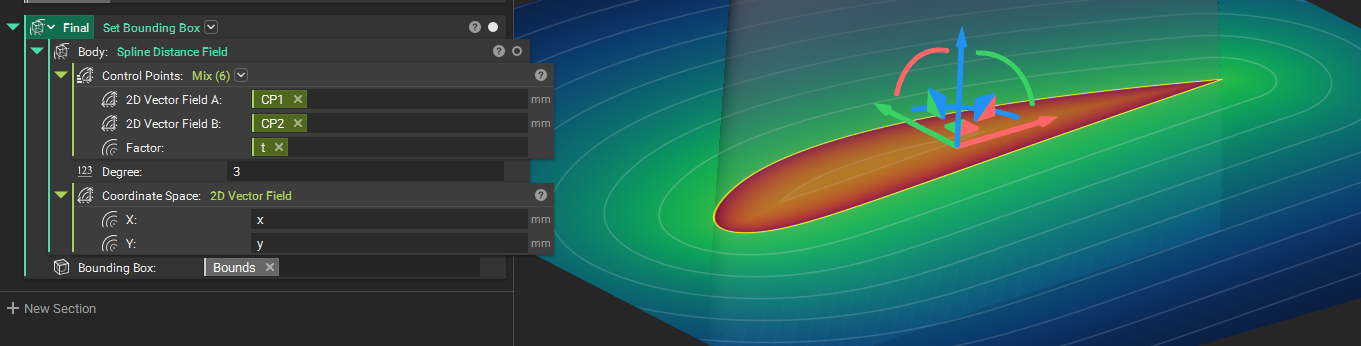
- The Spline Distance Field block creates an implicit Spline curve. The signed distance of a planar Spline curve is returned.
- Commonly used for creating implicit profiles, for applications such as turbine blades.
- Location: Create > Primitives
- Control Points: List of control points of the Spline curve.
- Degree: Degree of the Spline.
- Coordinate Space: Vector Field representing the basis in which to evaluate the curve.
- Output: Implicit Body
Extend Curve
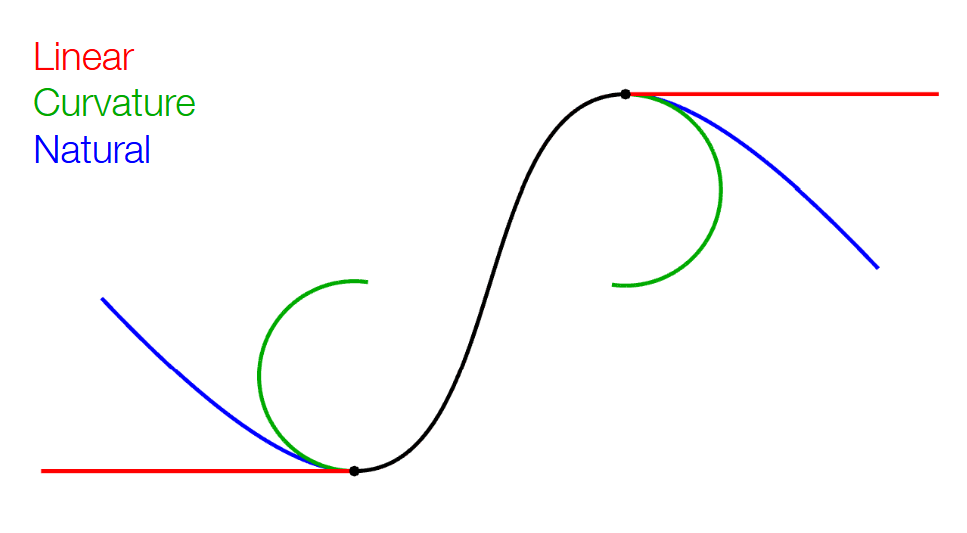
- The Extend Curve block extends a curve by a given distance from one or both of its ends, returning the extended curve as a Polycurve.
- Commonly used for general curve construction and freeform surfacing.
- Location: Create > Curves
- Curve: Curve to extend.
- Distance: Distance by which to extend the curve.
- Extend From: End or ends of the curve to extend from.
- Extension Type: Method of extension. Linear (G1) appends a straight line along the end tangent. Curvature (G2) extends along a circular arc matching the end tangent and curvature; always well-behaved. Natural (G-infinity) analytically continues the curve's own equation for an infinitely smooth junction, capping the analytic part before it can fold back on itself and continuing with an arc.
- Output: Polycurve